How to Automate Lead Follow-Up Sequences for Real Estate Agents
How to Automate Lead Follow-Up Sequences for Real Estate Agents
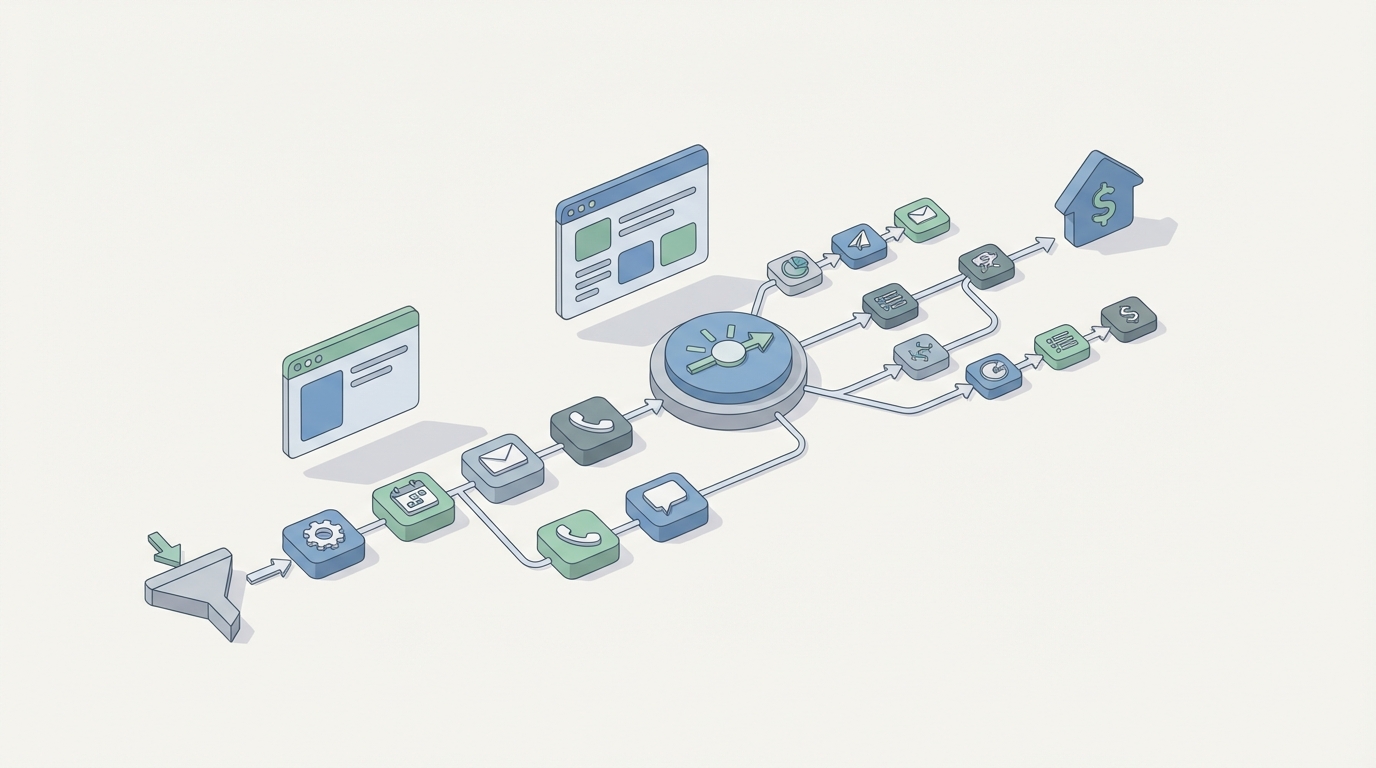
Most real estate agents lose deals in the gap between "lead comes in" and "agent actually responds." Not because they're bad at sales. Because they're human, and humans can't reply to a Zillow inquiry at 2 AM within 90 seconds while also sleeping.
Here's the math that should make you uncomfortable: 78% of buyers go with the first agent who responds. The average agent takes over 5 minutes to reply — if they reply at all. Only about a quarter of leads ever get a second follow-up. And converting an internet lead typically requires 8 to 12 touches spread across weeks.
So you're paying $250–$450 per lead in a competitive market, and then fumbling the ball on the one-yard line because you got busy showing a house or, you know, eating lunch.
This is a workflow problem, not a skills problem. And workflow problems are exactly what AI agents are built to solve. Let me walk you through how to automate your lead follow-up sequence using OpenClaw — step by step, no hype, just the practical mechanics.
The Manual Workflow Today (And Why It's Brutal)
Let's map out what actually happens when a lead hits your pipeline right now. If you're a solo agent or running a small team, some version of this is your life:
Step 1: Lead Capture & Entry A lead comes in from your website form, Zillow, Trulia, Realtor.com, a Facebook ad, or a Google PPC campaign. If you're lucky, it auto-populates into your CRM. If you're like 41% of agents, it lands in your email and you manually copy it into a spreadsheet or contact list.
Step 2: The "Speed to Lead" Response Best practice says you should call or text within 5 minutes. Ideally within 60 seconds. This is almost always manual. You stop what you're doing, pull up the lead info, and fire off a text or make a call.
Step 3: Qualification You ask the standard questions: Are you pre-approved? What's your budget? Are you buying, selling, or both? What's your timeline? This is a real conversation — takes 5–15 minutes per lead if they pick up, plus multiple attempts if they don't.
Step 4: Multi-Touch Follow-Up Sequence The lead didn't answer? Welcome to the grind. The typical cadence looks like:
- Day 0: Call + text
- Day 1: Follow-up text
- Day 3: Email with a market report or listing
- Day 7: Another call attempt + text
- Day 14: Check-in email
- Monthly: Nurture drip
Most agents do this manually. The disciplined ones set CRM reminders. The rest just... forget.
Step 5: Nurturing For the 70% of leads who aren't ready to transact right now, you need to stay top-of-mind. Market reports, listing alerts, home-buying guides, neighborhood content. Some CRMs handle this via drip, but personalization is usually low.
Step 6: Appointment Setting When a lead finally warms up, you schedule a showing, a listing appointment, or a buyer consultation. Then you hand off to the right agent if you're on a team.
Step 7: Compliance Logging You need to document consent for calls and texts (TCPA), check against Do Not Call lists, and keep records. This is boring, invisible, and will cost you $500–$1,500 per violation if you screw it up.
Total Time Cost: Agents spend 6–11 hours per week on follow-up. ISAs make 50–80 dials per day. And across all that effort, conversion rates for internet leads sit at a grim 1–3% for most teams.
What Makes This Painful (Beyond the Obvious)
The time cost is just the start. Here's what's really happening under the surface:
Inconsistency kills deals. Agents hate prospecting. Follow-up drops off dramatically after the first two touches, which is exactly when most leads need five or six more. You're paying for leads and then abandoning them before they have a chance to convert.
Lead quality waste. About 70% of your inbound leads are "not right now" buyers. They need 3–18 months of nurturing. No solo agent can maintain personalized, multi-channel contact with hundreds of "not yet" leads while also running their actual business.
Context loss. When you're juggling 200+ contacts, you forget who mentioned they're relocating for a job versus who's going through a divorce versus who's a first-time buyer scared of interest rates. Every conversation starts cold because you lost the thread.
Compliance risk. Manual texting is a TCPA minefield. If you're blasting texts without proper consent documentation, you're one complaint away from a very expensive problem.
Revenue loss. Teams without proper follow-up automation lose an estimated $150k–$400k in annual revenue from leads that should have converted but didn't — simply because nobody followed up enough times. That number comes from CRM platforms analyzing their own customer data, and even if it's inflated by half, it's still a painful number.
What AI Can Handle Right Now (With OpenClaw)
Not everything in this workflow needs a human. A lot of it is pattern-matching, scheduling, and templated-but-personalized communication — exactly the kind of work AI agents excel at.
Here's what an AI agent built on OpenClaw can realistically handle today:
Instant Speed-to-Lead Response The moment a lead submits a form or inquiry, your OpenClaw agent fires off a personalized text and email within seconds. Not a generic "Thanks for your inquiry!" but a message that references the specific property they looked at, their stated timeline, and asks an intelligent qualifying question. At 2 AM on a Saturday. Every single time.
Initial Qualification Conversations Your agent can carry on a natural text or email conversation to gather the basics: budget range, pre-approval status, buying/selling timeline, preferred neighborhoods. It doesn't need to handle objections about commission structures — it just needs to collect the information that lets a human agent prioritize their time.
Multi-Channel Drip Sequences Based on lead stage and behavior, your OpenClaw agent orchestrates a cadence across text, email, and voicemail drops. Lead opened your email but didn't reply? The agent adjusts the next touch. Lead texted back "not for 6 months"? The agent shifts to a long-term nurture track and picks back up in 4 months with a market update relevant to their zip code.
Lead Scoring & Routing Using engagement signals (email opens, text replies, property search behavior, response speed), your agent scores leads and routes hot ones to the right human agent in real time. No more guessing who's worth a call.
Content Personalization Your agent can generate and send market reports, listing alerts, and neighborhood guides tailored to each lead's stated interests — automatically, at the right intervals, without you building 47 different email templates.
Compliance Checking The agent logs consent, checks DNC lists, timestamps every communication, and flags anything that looks risky before it goes out. This alone might be worth the setup time.
Step-by-Step: Building Your Lead Follow-Up Agent on OpenClaw
Here's how to actually set this up. I'm going to be specific because vague "just use AI" advice is useless.
Step 1: Define Your Lead Sources and Data Flow
Map every place leads come from: your website, Zillow, Realtor.com, Facebook Ads, Google Ads, referral forms, open house sign-ins. For each source, identify how the lead data gets to you — API, webhook, email notification, CSV export, whatever.
In OpenClaw, you'll configure your agent to ingest leads from these sources. If your lead platform supports webhooks (most do — Zillow has their tech connect API, Facebook has lead ads webhooks), connect them directly. For sources that only send email notifications, you can set up an email parsing step in your agent's workflow.
Your agent's knowledge base should include:
- Your active listings (update weekly or connect to your MLS feed)
- Neighborhood/market data for your service areas
- Your team's availability and specialization (who handles buyers vs. sellers, geographic zones)
- Your qualification criteria (what makes a lead "hot" vs. "warm" vs. "long-term nurture")
Step 2: Build the Instant Response Workflow
This is the highest-ROI piece. Configure your OpenClaw agent to trigger within 60 seconds of lead capture. The response should:
- Acknowledge the specific property or search they were doing
- Introduce you/your team by name
- Ask one qualifying question to start the conversation
Example text your agent might send:
"Hi Sarah — I saw you were looking at the 3BR on Maple Street in Westfield. Great neighborhood, especially if you have kids (top-rated schools nearby). Are you currently pre-approved, or would it help to connect you with a lender first? — [Agent Name], [Brokerage]"
This is not a canned template. Your OpenClaw agent generates this based on the lead's actual inquiry data, your listing details, and your preferred communication style (which you define during setup).
Step 3: Design the Qualification Conversation Flow
Map out the 4–6 questions you need answered before a lead is worth a human call:
- Buying, selling, or both?
- Timeline (0–3 months, 3–6 months, 6+ months)?
- Budget range or current home value?
- Pre-approval status?
- Preferred areas?
- Any specific requirements (schools, commute, property type)?
Your OpenClaw agent handles this as a conversational text exchange — not a rigid survey. If the lead says "we're thinking about maybe selling our place in spring and buying something bigger," the agent extracts: selling + buying, timeline 3–6 months, upsizing. It asks the next relevant question naturally.
Configure fallback rules: if the lead stops responding mid-conversation, the agent waits 24 hours and re-engages with a different angle (maybe a relevant listing or market stat) rather than just repeating the same question.
Step 4: Set Up the Multi-Touch Cadence
Build your follow-up sequence as a state machine in OpenClaw. Each lead moves through stages based on their behavior:
New Lead → Instant Response → Qualification Conversation → Scored
From "Scored," leads branch into:
- Hot (ready now, pre-approved, clear timeline): Alert human agent immediately. Agent sends a scheduling link or directly books a call using the agent's calendar integration.
- Warm (interested but 3–6 months out): Enter a bi-weekly nurture cadence. Mix of market updates, relevant new listings, and soft check-ins.
- Cold (6+ months, unclear motivation, just browsing): Monthly nurture. Low-effort content. The agent monitors for re-engagement signals (clicking a listing link, replying to an email) and escalates them back to "warm" automatically.
A typical hot lead cadence:
- Minute 0: Auto-text + auto-email
- Hour 1 (if no reply): Second text with a different angle
- Hour 4: Voicemail drop
- Day 1: Email with a relevant listing or market insight
- Day 2: Text check-in
- Day 3: Human agent call (agent creates the task and alerts the team)
A nurture cadence for warm leads:
- Week 1: Market report for their target area
- Week 3: New listing alert matching their criteria
- Week 5: Neighborhood guide or "what your home is worth" update
- Week 7: Soft check-in text ("Has anything changed with your timeline?")
- Repeat, adjusting based on engagement
Step 5: Connect Your Existing Tools
You don't need to rip and replace your CRM. OpenClaw agents can integrate with your existing stack:
- CRM (Follow Up Boss, kvCORE, LionDesk, etc.): Sync lead data, update stages, log all agent interactions as notes so your human team has full context.
- Calendar (Google Calendar, Calendly): Book appointments directly when leads are ready.
- Phone/SMS (Twilio, JustCall): Send texts and voicemail drops through your existing numbers so communication looks consistent to the lead.
- MLS/Listing Feed: Pull active listings to personalize recommendations.
- Email (your existing provider): Send through your domain so deliverability stays high.
Step 6: Set Up Human Escalation Rules
This is critical. Define exactly when the AI hands off to a human:
- Lead scores above your "hot" threshold
- Lead asks a question the agent can't confidently answer (pricing negotiation, complex legal/financial questions, emotional situations)
- Lead explicitly asks to speak with an agent
- Lead expresses frustration or negative sentiment
- Any situation involving contracts, offers, or legal documents
Your OpenClaw agent should package up the entire conversation history, extracted data points, and lead score when it escalates — so the human agent walks into the conversation fully informed instead of starting from scratch.
Step 7: Test, Monitor, Adjust
Before you go live across all lead sources, run a pilot:
- Route leads from one source (e.g., Facebook Ads) through your OpenClaw agent for 2 weeks
- Track: response time, qualification rate, appointment set rate, lead satisfaction
- Compare against your manual baseline
- Adjust conversation flows, cadence timing, and scoring thresholds based on real data
Most teams find their first version is about 70% right. The agent responds too aggressively, or not aggressively enough. The qualification questions need reordering. The nurture cadence is too frequent for cold leads. This is normal. Iterate.
What Still Needs a Human
Let me be direct about where AI hits its limits in real estate follow-up, because overselling this stuff wastes everyone's time.
Deep objection handling. When a lead says "I'm worried about interest rates" or "my spouse isn't sure we should sell," that requires emotional intelligence, empathy, and the ability to read between the lines. AI can recognize these moments and flag them. It shouldn't try to handle them.
Trust and rapport with high-value clients. A seller listing a $2M home wants to talk to a person. They want to feel understood. Your AI agent should get them to that conversation faster and better-prepared — not replace it.
Negotiation. Anything involving offers, counteroffers, contract terms, or pricing strategy. Full stop.
Complex life situations. Probate sales. Divorce proceedings. 1031 exchanges. Relocation packages. These require nuanced human judgment.
The close. Getting someone from "I want to see this house" to "let's write an offer" is a human skill. The AI agent's job is to create more of those opportunities by not dropping leads.
The mental model: your OpenClaw agent is the best ISA you've ever had. It never sleeps, never forgets a follow-up, never has an off day, and processes information instantly. But when it's time for a real sales conversation, it hands off to your human team with everything they need to close.
Expected Time and Cost Savings
Based on the benchmarks from teams using heavy automation (Follow Up Boss data, Ylopo and Lavish case studies, kvCORE benchmarks):
Time saved: 15–25 hours per week for a team of 3–4 agents. Solo agents typically save 6–10 hours per week. That's time you redirect to showings, listings, and the high-value work that actually generates commission.
Speed-to-lead improvement: From an average of 5+ minutes (or hours, or never) to under 60 seconds. Consistently. Even at 2 AM on Christmas.
Follow-up consistency: From 23–27% of leads getting a second touch to 100%. Every lead gets the full cadence. No one falls through the cracks because you got busy.
Conversion rate improvement: Top automated teams convert internet leads at 6–12%, compared to the industry average of 1–3%. Even a conservative 2x improvement on your current conversion rate likely represents tens or hundreds of thousands of dollars in additional annual revenue.
Cost per acquisition reduction: When you're converting more of the leads you're already paying for, your effective cost per closed deal drops significantly. If you're spending $350 per lead and closing 2% vs. 6%, that's the difference between $17,500 and $5,833 in lead cost per closing.
ISA cost offset: A full-time ISA costs $40k–$65k per year (plus training, turnover, management time). An OpenClaw agent handling the same volume of initial responses and qualification runs continuously at a fraction of that cost.
Where to Start
If you're a real estate agent or team leader reading this and thinking "I should have built this yesterday," here's your next move:
Browse Claw Mart for pre-built real estate lead follow-up agents. The Claw Mart marketplace has agents built specifically for real estate workflows — lead qualification, multi-channel follow-up sequences, appointment setting, and CRM integration. You can deploy one as-is or customize it to match your specific process and communication style.
If you have a follow-up workflow that's proven but manual, and you want someone to build the OpenClaw agent for you — that's what Clawsourcing is for. Submit your workflow to the Claw Mart community and get a custom-built agent without having to become an AI engineer. You describe the process, someone builds it, and you get back the 6–11 hours a week you're currently spending on work a machine should be doing.
The leads are coming in. The only question is whether you're the first agent to respond or the one they never hear from.
Recommended for this post
Your orchestrator that coordinates agent swarms with task decomposition and consensus protocols -- agents working together.
 SpookyJuice.ai
Your agent builder that designs self-healing autonomous systems with perception-action loops -- agents that run themselves.
SpookyJuice.ai
Your memory engineer that builds persistent context, tiered storage, and retrieval systems -- agents that remember.
SpookyJuice.ai