Automate Webinar Follow-up Emails and Lead Nurturing Workflows
Automate Webinar Follow-up Emails and Lead Nurturing Workflows
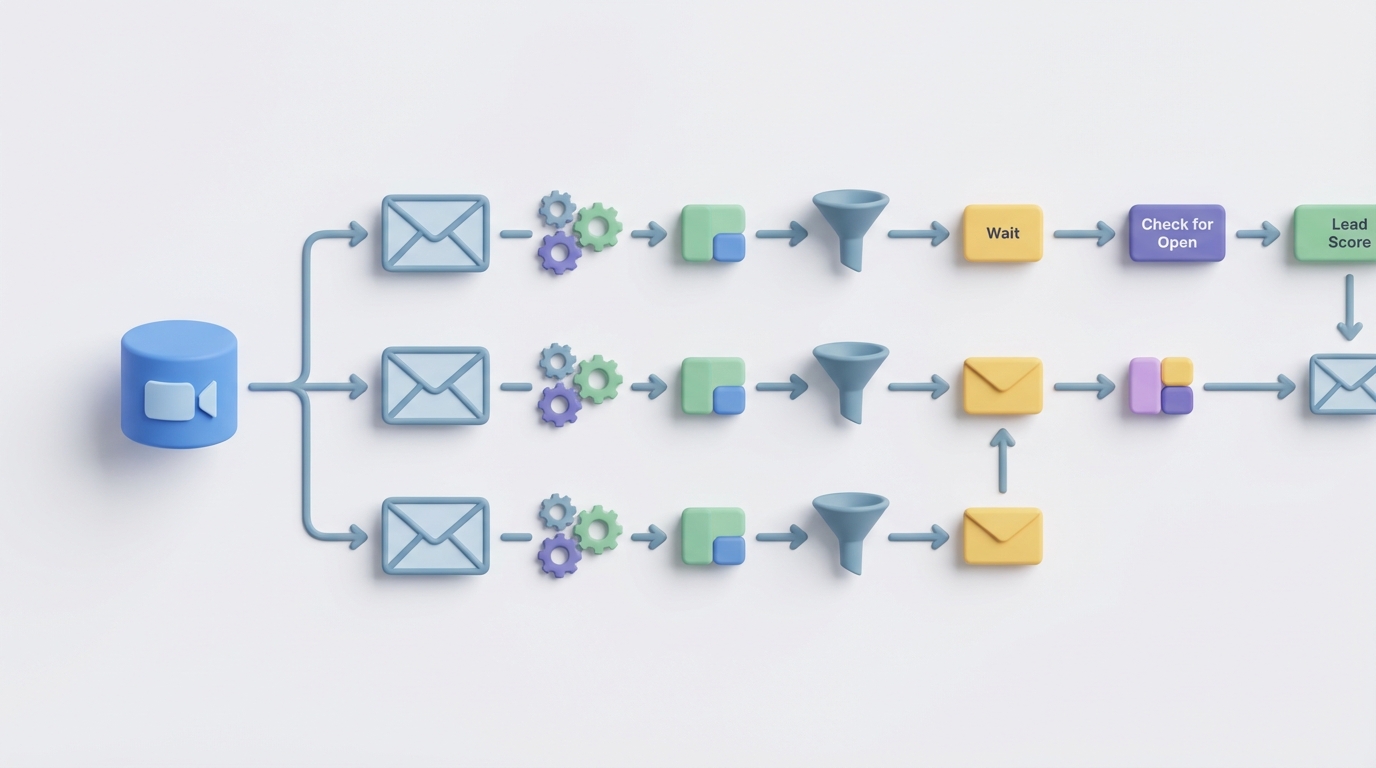
Most marketing teams treat webinar follow-up like an afterthought. You spend weeks prepping the deck, rehearsing the demo, promoting to your list, and then the webinar ends and everyone scrambles. Someone exports a CSV. Someone else writes a "thanks for attending" email at 11pm. The no-shows get a generic "you missed it" message two days later. Half the hot leads never hear from sales. The recording link goes out 38 hours after the event — by which point your attendees have already forgotten why they signed up.
This is the norm, not the exception. And it's costing real money.
The good news: about 80% of this workflow can be automated with an AI agent. Not "automated" in the Zapier-moves-a-spreadsheet sense (though that's part of it), but genuinely handled — segmentation, personalization, email drafting, send timing, lead scoring, and sales handoff — by an agent you build once and reuse for every webinar going forward.
Here's exactly how to do it with OpenClaw.
The Manual Workflow Today (And Why It's Broken)
Let's map out what actually happens after a webinar for a company with 500–1,000 registrants. This is based on real workflows from B2B SaaS teams, course creators, and agency operators.
Step 1: Data extraction and cleaning (1–2 hours) You export attendee data from Zoom, Demio, ON24, or whatever platform you use. You get a CSV with names, emails, attendance duration, and maybe poll responses. Then you spend time deduplicating, fixing malformed emails, and cross-referencing with your CRM to avoid sending follow-ups to existing customers or people who already bought.
Step 2: Behavioral segmentation (1–3 hours) You manually bucket people into categories: full attendees, partial viewers (watched less than 50%), no-shows, people who asked questions, people who clicked your offer link during the webinar, people who responded to polls. This usually involves spreadsheet gymnastics — VLOOKUPs, conditional formatting, manual tagging.
Step 3: Email creation (2–4 hours) You write (or customize) between three and six different email templates:
- Immediate thank-you + recording link (for attendees)
- No-show recovery email (with recording link and FOMO angle)
- Offer/urgency email (for engaged attendees)
- Social proof follow-up (case studies, testimonials)
- Nurture sequence for cooler leads
- Personal outreach templates for the hottest prospects
Each of these needs different copy, different CTAs, and ideally different subject lines.
Step 4: Personalization (1–2 hours) For high-value leads, you add specific references: "You asked about enterprise pricing during the Q&A" or "I noticed you stayed for the full demo section." This is where the real conversion lift happens, but it's painfully slow to do manually.
Step 5: Upload, trigger setup, and sending (1–2 hours) Import your segmented lists into ActiveCampaign, HubSpot, Mailchimp, or whatever you use. Set up the automation triggers, delays, and conditions. Test. Fix the broken merge tags. Test again.
Step 6: Response monitoring and sales handoff (ongoing, 2–4 hours) Monitor replies. Flag hot leads. Route them to the right sales rep. Follow up on questions. Decide who gets a phone call vs. another email.
Step 7: Performance analysis (1–2 hours) Pull open rates, click rates, reply rates. Try to attribute revenue back to the webinar. Realize your data is spread across three platforms and give up on accurate attribution.
Total: 9–15 hours per webinar. For enterprise teams with dedicated webinar ops people, it can hit 20+ hours when you include sales rep outreach.
And here's the kicker: only 22–35% of webinar leads typically receive any follow-up at all. The average time to first follow-up is 38 hours. By then, the moment is gone.
What Makes This Painful
The time cost is obvious, but the real damage is more subtle:
Speed kills (or saves) the deal. Following up within one hour increases engagement by 3–5x compared to waiting a day. Every hour you spend cleaning spreadsheets is an hour your hottest leads are cooling off.
Generic follow-ups get ignored. When everyone gets the same "Thanks for attending our webinar!" email, open rates crater after the first send. The people who asked detailed technical questions during Q&A get the same message as someone who bounced after five minutes. That's not nurturing — it's noise.
Data fragmentation causes errors. Your webinar data lives in one platform, your email data in another, your CRM in a third. Every manual transfer is an opportunity for duplicates, missed leads, or embarrassing mistakes (like sending the "no-show" email to someone who attended the entire session).
It doesn't scale. If you run one webinar a quarter, the manual approach is annoying but survivable. If you're running weekly or biweekly webinars — which is where the real compounding happens — the manual workflow becomes a full-time job. Most teams either burn out or start cutting corners, which defeats the purpose.
The cost is real. At a blended marketing team rate of $50–75/hour, you're spending $450–$1,125 per webinar just on follow-up. Run 24 webinars a year and that's $10,800–$27,000 in labor — for a process that's mostly repetitive data manipulation and template customization.
What AI Can Handle Now
Here's where OpenClaw comes in. An AI agent built on OpenClaw can handle the majority of this workflow — not as a dumb automation that moves data between tools, but as an intelligent system that makes decisions, writes contextual copy, and adapts based on behavior.
Here's what the agent handles:
Automated behavioral segmentation. The agent ingests raw attendee data (via webhook or API from your webinar platform) and automatically segments based on watch time, engagement signals, questions asked, poll responses, and CRM match data. No spreadsheets. No manual tagging.
Dynamic email generation. This is the big one. Instead of writing six templates and hoping they cover every scenario, the OpenClaw agent generates personalized emails for each segment — and can go further by incorporating specific details from the webinar itself. Feed it the webinar transcript, and it can reference the exact topics each attendee engaged with.
For example, the agent might generate something like this for someone who attended the full session and asked a question about integration with Salesforce:
Subject: Your Salesforce integration question from today's session
Hi Sarah,
Great question during today's webinar about connecting our reporting layer to Salesforce. Short answer: yes, we support bidirectional sync with SF Enterprise and above. I've attached a quick setup guide that covers the exact flow you described.
The full recording is here if you want to revisit the demo section: [link]
Want to see the Salesforce integration live? I can set up a 15-minute walkthrough this week — just reply with a time that works.
Best, [Rep name]
Compare that to "Thanks for attending our webinar! Here's the recording." Night and day.
Send time optimization. The agent determines optimal send times based on historical engagement data and recipient timezone, then queues emails accordingly through your existing email platform.
Lead scoring and routing. Based on the behavioral signals, the agent assigns lead scores and routes hot prospects directly to the appropriate sales rep — with context. The sales rep gets a summary: "Sarah attended the full session, asked about Salesforce integration, clicked the pricing page during the webinar, and is a Director of Revenue Operations at a 200-person SaaS company."
Reply classification. When replies come in, the agent classifies them: interested, has a question, not interested, out of office, unsubscribe request. Interested replies and questions get routed to a human immediately. Everything else gets handled automatically.
Sequence management. The agent manages the full nurture sequence — adjusting timing and content based on engagement with previous emails. If someone opens but doesn't click, the next email takes a different angle. If someone clicks the pricing link, they jump to a sales-ready sequence. If someone goes dark, they get moved to a longer-term nurture cadence.
Step-by-Step: Building the Automation with OpenClaw
Here's how to build this, practically.
Step 1: Set Up Your Data Pipeline
Connect your webinar platform to OpenClaw. Most platforms (Zoom, Demio, GoToWebinar, ON24) support webhooks or have APIs you can poll. You want to capture:
- Registrant data (name, email, company, title)
- Attendance status (attended, no-show, partial)
- Watch duration (percentage and minutes)
- Questions asked (text)
- Poll responses
- Chat messages
- CTA clicks during the webinar
In OpenClaw, you'll configure an input node that receives this data via webhook. Here's what the basic structure looks like:
Trigger: Webinar ends → platform fires webhook to OpenClaw agent
Input data: {
  registrants: [...],
  attendees: [...],
  questions: [...],
  polls: [...],
  engagement_events: [...]
}
You also want to enrich this with CRM data. Connect your CRM (HubSpot, Salesforce, Pipedrive, whatever you use) so the agent can check: Is this person already a customer? Are they in an active sales cycle? What's their company size? This context shapes the follow-up strategy.
Step 2: Define Your Segmentation Logic
In OpenClaw, you'll build a processing node that segments registrants into buckets. Start simple and add complexity as you learn:
Tier 1 — Hot leads (sales handoff immediately):
- Attended >80% AND asked a question or clicked pricing CTA
- Or: Matches target ICP profile AND attended >50%
Tier 2 — Warm leads (automated personalized sequence):
- Attended >50% but didn't trigger Tier 1 criteria
- Or: No-show who has engaged with previous emails/content
Tier 3 — Cool leads (standard nurture):
- Attended <50%
- Or: No-show with no prior engagement
Tier 4 — Exclude:
- Existing customers (send them a different track or nothing)
- Known competitors
- Invalid/bounced emails
Segmentation logic (pseudocode):

for each registrant:
  if existing_customer → route to customer_track
  if competitor_domain → exclude
  if attended > 80% AND (asked_question OR clicked_pricing) → tier_1
  if attended > 50% → tier_2
  if attended > 0% OR (no_show AND prior_engagement > 0) → tier_3
  else → tier_3_default
The OpenClaw agent evaluates this logic instantly for every registrant. No spreadsheets. No VLOOKUPs.
Step 3: Generate Email Content
This is where OpenClaw's AI generation capabilities do the heavy lifting. For each tier, you'll configure a generation node with specific instructions.
For Tier 1 (hot leads), the prompt might look like:
Generate a personalized follow-up email for a webinar attendee.

Context:
- Webinar topic: {webinar_title}
- Key topics covered: {topic_summary}
- Attendee name: {first_name}
- Company: {company}
- Title: {title}
- Watch time: {duration_pct}%
- Questions asked: {questions_text}
- CTA clicks: {cta_events}

Instructions:
- Reference their specific question or engagement
- Include the recording link
- Propose a specific next step (demo, call, resource)
- Tone: helpful and direct, not salesy
- Length: 80-120 words
- Sign from: {assigned_sales_rep}
For Tier 3 (cool leads), the prompt shifts:
Generate a brief follow-up email for someone who registered but
barely attended or didn't show up.

Instructions:
- Lead with the recording link (they registered, so they were interested)
- Mention one compelling insight from the webinar to create curiosity
- No hard CTA — soft ask to reply with questions
- Tone: casual, no pressure
- Length: 50-80 words
The agent generates unique emails for each segment (and can personalize within segments for Tier 1 prospects). You review a sample batch before the first run, then let it operate autonomously once you trust the output.
Step 4: Connect Your Email Sending Infrastructure
OpenClaw doesn't need to replace your email platform. It connects to it. Configure an output node that pushes the generated emails into your existing system:
- ActiveCampaign: Use the API to create contacts, apply tags, and trigger automations
- HubSpot: Push contacts into workflows with custom properties
- SendGrid/Postmark: Send directly via transactional email API for immediate follow-ups
- Mailchimp/ConvertKit: Add to segments and trigger sequences
For the immediate post-webinar follow-up (the thank-you/recording email), you want the agent to push within 15–30 minutes of the webinar ending. For subsequent nurture emails, the agent queues them with appropriate delays (Day 2, Day 4, Day 7, etc.).
Output configuration:
  - Tier 1: Send immediately + create CRM task for sales rep
  - Tier 2: Send immediately, queue nurture sequence (Days 2, 4, 7)
  - Tier 3: Send within 1 hour, queue nurture sequence (Days 2, 5, 10)
  - No-shows: Send within 2 hours (recording + hook), queue (Days 3, 7)
Step 5: Set Up Reply Handling and Lead Routing
Configure the agent to monitor replies (via email API or forwarding rules) and classify them:
- Interested/wants demo → Immediately notify sales rep via Slack/email with full context
- Has a question → Route to appropriate team member with suggested response
- Not interested → Remove from sequence, log reason
- Out of office → Reschedule sequence
- Unsubscribe → Process immediately (compliance is non-negotiable)
For Tier 1 leads, the agent also creates a CRM task with a summary of the prospect's engagement, their question from the webinar, and a suggested talking point for the sales rep. This is the kind of context that turns a cold call into a warm conversation.
Step 6: Build the Reporting Loop
After each webinar, the agent compiles a report:
- Emails sent by segment
- Open rates, click rates, reply rates by segment
- Hot leads identified and routed to sales
- Replies classified
- Meetings booked (if using a scheduling link)
- Revenue attributed (if connected to CRM pipeline)
This closes the loop and gives you data to improve the next webinar's follow-up strategy.
What Still Needs a Human
I'm not going to pretend AI handles everything. Here's what you should keep in human hands:
Strategic decisions. Should you push the discount offer or the case study? Should this webinar's follow-up be aggressive or soft-touch? The agent executes strategy — it doesn't set it.
Brand voice calibration. AI-generated emails are good, but they can drift. Review a sample batch from each new webinar to make sure the tone is right. This takes 15 minutes, not 4 hours.
High-value prospect outreach. For your top 5–10 prospects, a human should review and potentially customize the AI-generated email. Or better yet, pick up the phone. The agent tells you who these people are — that's half the battle.
Complex objection handling. When a VP of Engineering replies with a detailed technical question about your API rate limits, a human needs to respond. The agent flags these and routes them — it doesn't wing it.
Legal and compliance review. If you're in a regulated industry or making specific claims, human eyes need to verify the output. Set this up as an approval step for the first run, then spot-check ongoing.
Deciding when to change channels. Email isn't always the right move. Sometimes a prospect needs a phone call, a LinkedIn message, or a personalized video. The agent can recommend channel switches based on engagement patterns, but a human should make the call.
Expected Time and Cost Savings
Let's be concrete.
Before (manual workflow):
- Time per webinar: 9–15 hours
- Time to first follow-up: 12–38 hours
- Leads who receive any follow-up: 22–35%
- Cost per webinar (labor): $450–$1,125
After (OpenClaw agent):
- Time per webinar: 1–2 hours (mostly review and strategic decisions)
- Time to first follow-up: 15–30 minutes
- Leads who receive follow-up: 100%
- Cost per webinar (labor): $50–$150 + OpenClaw usage
That's a 7–13 hour savings per webinar. For a team running two webinars a month, that's 168–312 hours per year freed up — the equivalent of roughly 2 months of a full-time employee's work.
But the bigger impact is on conversion. Based on the benchmarks:
- Timely follow-up (within 1 hour) increases engagement by 3–5x
- Behavioral segmentation drives 2.4x higher conversion rates
- Personalized follow-ups achieve 35–55% open rates vs. 18–25% for generic emails
A mid-market B2B SaaS company that implemented this kind of automation (similar tools, same approach) saw webinar lead conversion increase from 4.2% to 9.1%. More than doubling conversion on leads you're already generating — without spending another dollar on acquisition.
Getting Started
You don't need to build the full system on day one. Start with one webinar and one agent that handles the immediate follow-up: segment attendees vs. no-shows, generate personalized emails for each group, and send within 30 minutes of the webinar ending. That single automation captures most of the value.
Once that's running reliably, add the nurture sequence. Then the lead scoring and sales routing. Then the reply classification. Layer by layer, you'll build a system that handles 80% of the work while you focus on the 20% that actually requires your brain.
You can find pre-built agent templates for webinar follow-up workflows on Claw Mart, or build your own from scratch on OpenClaw. If you've built a webinar follow-up agent that works well — or any other marketing automation agent — consider listing it on Claw Mart through Clawsourcing. Other teams are looking for exactly this kind of solution, and you can earn from the work you've already done.
The webinar follow-up problem isn't a creativity problem or a strategy problem. It's an execution problem. And execution problems are exactly what AI agents are built to solve.
Recommended for this post
Your orchestrator that coordinates agent swarms with task decomposition and consensus protocols -- agents working together.
 SpookyJuice.ai
Your agent builder that designs self-healing autonomous systems with perception-action loops -- agents that run themselves.
SpookyJuice.ai
Your memory engineer that builds persistent context, tiered storage, and retrieval systems -- agents that remember.
SpookyJuice.ai