Automate Thumbnail Generation and A/B Testing Workflow
Automate Thumbnail Generation and A/B Testing Workflow
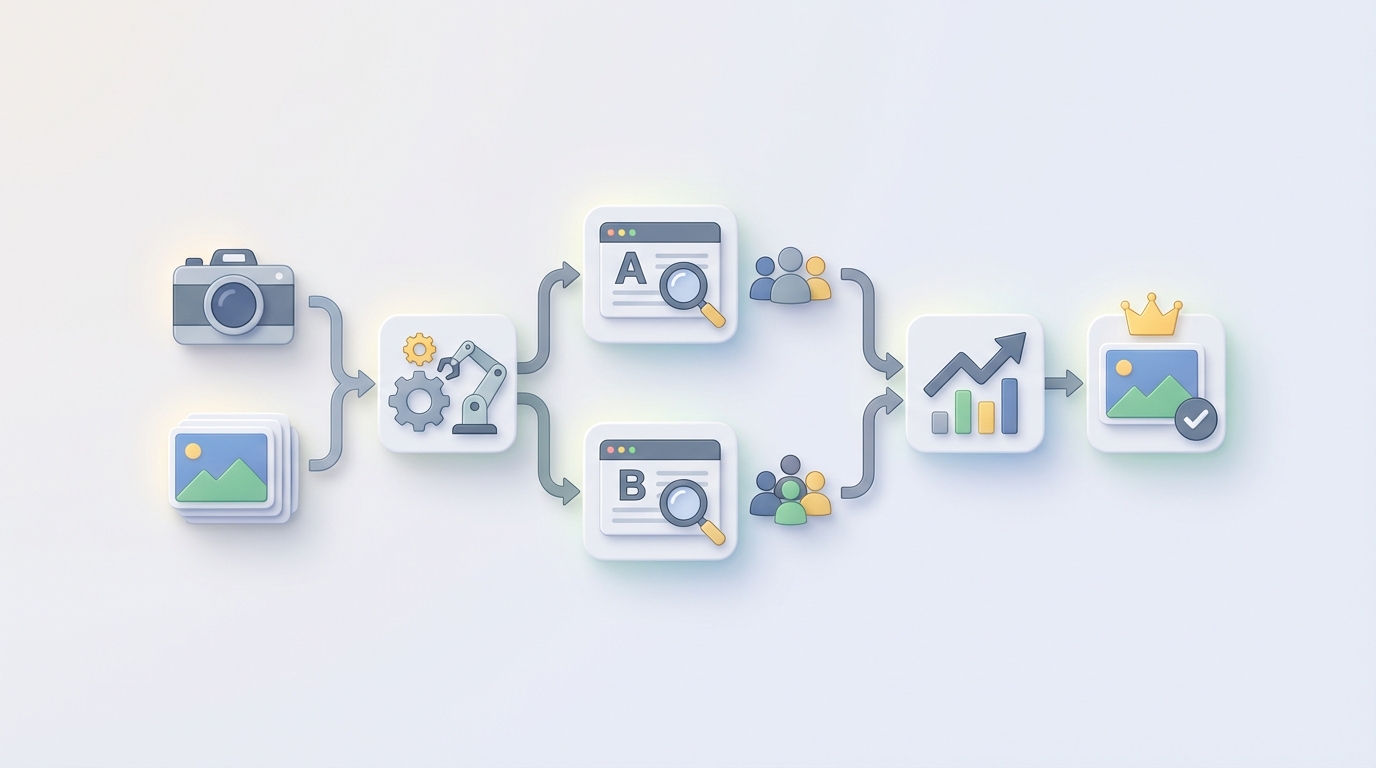
Most creators treat thumbnails like an afterthought. Slap a surprised face on a bright background, add some bold text, ship it. Then they wonder why their CTR hovers around 3% while channels half their size are pulling 10%+.
The creators who actually win at YouTube treat thumbnails like a systematic, testable, iteratable process. MrBeast's team spends days on a single thumbnail. Ali Abdaal calls it one of the highest-ROI activities in his entire business. Agencies managing 20+ channels employ full-time thumbnail designers at $3k–$8k per month in labor costs alone.
Here's the thing though: most of that process is repetitive, templatable, and ripe for automation. Not all of it — we'll get to that — but enough that you can collapse a 45-minute-per-video workflow into something that takes about 5 minutes of human decision-making, with an AI agent handling everything else.
This guide walks through exactly how to build that system using OpenClaw.
The Manual Workflow (And Why It's Killing Your Output)
Let's be honest about what creating a good thumbnail actually looks like when you do it properly. This is the real workflow, not the "I'll just pick a frame from the video" shortcut that kills your CTR.
Step 1: Frame Selection (5–15 minutes) You scrub through the entire video — or review YouTube's auto-generated options, which are almost always terrible — looking for the highest-emotion, most visually striking frame. You're looking for a face with a strong expression, good lighting, and a composition that won't fall apart when you start adding elements. If you're a talking-head creator, you might screenshot 15–20 candidates before finding one that works.
Step 2: Concept and Hook Development (5–10 minutes) You decide what the thumbnail is about. Not the video topic — the emotional hook. "Shocked face + giant number + arrow pointing at something" is a different concept than "calm authority figure + clean text + product focus." You're making a strategic decision about what will trigger a click from your specific audience on this specific day.
Step 3: Design and Composition (10–20 minutes) Open Canva or Photoshop. Composite the elements together. Cut out the background. Add bold text (usually 3–7 words max). Apply glow effects, borders, zoom effects, color overlays. Make sure text is readable at mobile thumbnail size. Adjust the visual hierarchy so the eye moves where you want it.
Step 4: Branding (3–5 minutes) Apply your brand fonts, colors, and logo placement. Ensure this thumbnail looks like it belongs on your channel page alongside your last 20 videos. Consistency matters — viewers should be able to identify your content in a sea of recommendations.
Step 5: Variant Creation (10–30 minutes) This is where good creators separate from great ones. You create 3–8 versions with different text, different expressions, different color schemes, different compositions. Maybe one version leads with text, another leads with face, another leads with the product or result.
Step 6: Testing and Iteration (ongoing, 24–72 hours) Upload your best guess as the custom thumbnail. Monitor CTR in YouTube Analytics. Wait 24–48 hours for meaningful data (YouTube's analytics lag is brutal). If CTR is below your channel average, swap in a different variant. Repeat for the first 72 hours, which is when most of your impressions happen.
Total time per video: 30–90 minutes for experienced creators. Multiply that by 4+ videos per week and you're spending an entire workday just on thumbnails. Every single week.
Total cost if outsourced: $5–$50 per thumbnail on Fiverr for mediocre work, or $3k–$8k/month for a dedicated designer who actually understands YouTube.
And here's the brutal part: even after all that effort, you're still mostly guessing. The difference between a 4% CTR thumbnail and an 8% CTR thumbnail can be something as subtle as which direction the subject is looking or whether the text says "I tried" versus "I tested." You won't know until you test, and testing manually is painfully slow.
What Actually Hurts
The pain isn't just the time. It's the compounding effect of several problems hitting at once:
Decision fatigue is real. After your 200th thumbnail, choosing between "slightly more surprised face" and "slightly less surprised face" starts to feel meaningless. Your judgment degrades. You start defaulting to whatever worked last time, which is how channels stagnate.
Inconsistency creeps in. When you're cranking out thumbnails under deadline pressure, quality varies wildly. Video #47 looks polished, video #48 looks like you made it in 3 minutes (because you did). Your channel page starts to look messy, which erodes trust.
The skill barrier is higher than people admit. Good thumbnails require understanding color theory, visual hierarchy, typography at small sizes, and audience psychology. Most creators are not graphic designers. Most graphic designers don't understand YouTube psychology. Finding someone who is both is expensive.
Testing is where most people give up entirely. Creating variants is tedious enough. Actually rotating them through YouTube's system, tracking the results, and making data-driven decisions? Almost nobody does this systematically. They test once, get inconclusive results because the sample size was too small, and go back to guessing.
And the cost scales linearly. Whether you're making 4 videos a week or 20, every additional video means another full thumbnail cycle. Agencies managing multiple channels feel this acutely — it's one of their biggest operational bottlenecks.
What AI Can Actually Handle Right Now
Let's be specific about what's automatable and what's not. I'm not going to pretend AI can replace your creative judgment. It can't. But it can handle a shocking amount of the mechanical work, and it can generate options faster than any human.
High-confidence automation (AI handles this well today):
- Frame extraction and ranking. Face detection + emotion analysis can scrub a video and surface the 10 strongest facial expression frames automatically. No more scrubbing through 20 minutes of footage.
- Text variation generation. Given a video title and description, an LLM can generate 20+ hook variations in seconds. "I Tested X for 30 Days" → "The Truth About X" → "X Changed Everything" → "Why Nobody Talks About X."
- Template application. Brand fonts, colors, logo placement, layout rules — all of this can be systematized and applied automatically to any frame + text combination.
- Background removal, color grading, glow effects, borders. Pure image processing. No reason a human should be doing this manually in 2026.
- Batch variant creation. Instead of manually creating 5 versions, generate 30 in the time it takes you to make 1.
- Thumbnail upload and rotation via YouTube API. Programmatic thumbnail swapping based on CTR thresholds. No more logging into YouTube Studio every 8 hours to manually check and replace.
- Basic CTR analysis and pattern recognition. Which colors, text styles, and compositions have historically performed best on your channel? AI can surface those patterns.
Requires human judgment (don't automate these):
- Emotional accuracy for your specific audience. AI can detect "surprise" on a face, but it can't tell you whether your audience responds better to genuine surprise or confident authority. That's strategic knowledge.
- Hook selection. AI generates 20 options. A human with channel knowledge picks the 3 worth testing.
- Avoiding misleading thumbnails. YouTube policy violations lead to demonetization. An AI doesn't understand the line between "compelling" and "misleading" in your specific niche.
- Final winner selection. Even with data, the final call on which thumbnail to ship requires taste.
The pattern is clear: AI handles generation and mechanics. Humans handle strategy and curation.
Building the Automation with OpenClaw: Step by Step
Here's how to build this as a working system. We're using OpenClaw as the backbone because it lets you chain together the different capabilities (vision, language, image generation, API calls) into a single agent workflow without duct-taping together 6 different tools.
Step 1: Frame Extraction Agent
Build an OpenClaw agent that takes a video file (or YouTube URL) as input and outputs ranked candidate frames.
The agent workflow:
- Input: Video file or URL
- Process: Extract frames at 1-second intervals. Run face detection on each frame. Score each frame on: face visibility, emotional intensity, lighting quality, composition (rule of thirds alignment), and visual distinctiveness from other high-scoring frames.
- Output: Top 10–15 ranked frames as PNG files with metadata (timestamp, emotion scores, composition scores).
# Pseudocode for the OpenClaw frame extraction agent

agent_config = {
    "name": "frame_extractor",
    "description": "Extracts and ranks emotionally strong frames from video",
    "steps": [
        {
            "action": "extract_frames",
            "params": {
                "interval_seconds": 1,
                "min_face_confidence": 0.85
            }
        },
        {
            "action": "score_frames",
            "params": {
                "criteria": [
                    "face_emotion_intensity",
                    "lighting_quality",
                    "composition_score",
                    "visual_distinctiveness"
                ],
                "top_n": 15
            }
        },
        {
            "action": "output_ranked_frames",
            "format": "png_with_metadata"
        }
    ]
}
This alone saves 5–15 minutes per video. More importantly, it catches strong frames you would have missed during manual scrubbing.
Step 2: Hook and Text Generation Agent
A second OpenClaw agent generates thumbnail text and hook concepts.
agent_config = {
    "name": "hook_generator",
    "description": "Generates thumbnail text variants and hook concepts",
    "inputs": ["video_title", "video_description", "channel_niche", "past_top_performers"],
    "steps": [
        {
            "action": "analyze_context",
            "params": {
                "consider": [
                    "video_topic",
                    "target_emotion",
                    "channel_historical_ctr_data",
                    "current_trending_formats"
                ]
            }
        },
        {
            "action": "generate_variants",
            "params": {
                "text_variants": 20,
                "max_words": 7,
                "styles": ["curiosity_gap", "authority", "shock", "result_focused", "minimal"]
            }
        },
        {
            "action": "rank_by_predicted_ctr",
            "params": {
                "model": "channel_specific_ctr_predictor"
            }
        }
    ]
}
Feed it your video title, description, and — critically — your channel's historical CTR data (what text styles have worked before). It outputs 20 text variants ranked by predicted performance.
Step 3: Composition and Design Agent
This is where it gets powerful. A third OpenClaw agent takes the top frames and top text variants, and composites them into finished thumbnail designs using your brand templates.
agent_config = {
    "name": "thumbnail_composer",
    "description": "Generates finished thumbnail variants from frames + text + brand templates",
    "inputs": ["ranked_frames", "ranked_text_variants", "brand_kit"],
    "steps": [
        {
            "action": "remove_backgrounds",
            "params": {"method": "subject_isolation"}
        },
        {
            "action": "apply_brand_templates",
            "params": {
                "templates": "channel_brand_kit",
                "variations_per_frame": 3,
                "include": [
                    "font_styles",
                    "color_schemes",
                    "logo_placement",
                    "glow_and_border_options"
                ]
            }
        },
        {
            "action": "compose_thumbnails",
            "params": {
                "combinations": "top_5_frames x top_5_texts x 3_template_variants",
                "output_size": "1280x720",
                "check_mobile_readability": True
            }
        },
        {
            "action": "quality_filter",
            "params": {
                "remove_if": [
                    "text_overlaps_face",
                    "text_unreadable_at_mobile_size",
                    "low_contrast_ratio"
                ]
            }
        }
    ]
}
This step generates up to 75 thumbnail variants (5 frames × 5 texts × 3 templates). The quality filter automatically removes any that have obvious problems — text overlapping the subject's face, unreadable text at mobile size, poor contrast.
After filtering, you typically end up with 20–40 viable thumbnails. A human reviews them in 2–3 minutes and picks the top 3–5 for testing.
Step 4: Automated A/B Testing Agent
This is the piece that truly changes the game. Most creators don't A/B test because the manual process is too tedious. With OpenClaw, you can build an agent that handles the entire testing cycle automatically.
agent_config = {
    "name": "thumbnail_ab_tester",
    "description": "Automatically rotates thumbnails and selects winners based on CTR",
    "inputs": ["thumbnail_variants", "youtube_video_id", "youtube_api_credentials"],
    "steps": [
        {
            "action": "upload_initial_thumbnail",
            "params": {"variant": "human_selected_top_pick"}
        },
        {
            "action": "monitor_ctr",
            "params": {
                "check_interval_hours": 6,
                "min_impressions_for_decision": 1000
            }
        },
        {
            "action": "rotate_thumbnail",
            "conditions": {
                "if_ctr_below": "channel_average",
                "swap_to": "next_ranked_variant",
                "max_rotations": 5
            }
        },
        {
            "action": "declare_winner",
            "conditions": {
                "if_ctr_above": "channel_average * 1.1",
                "or_after_rotations": 5,
                "keep_best_performer": True
            }
        },
        {
            "action": "log_results",
            "params": {
                "store_in": "channel_ctr_database",
                "track": ["thumbnail_style", "text_style", "emotion_type", "color_scheme", "ctr"]
            }
        }
    ]
}
The agent uploads your first-choice thumbnail. Every 6 hours (or whatever interval you set), it checks CTR via the YouTube API. If CTR is below your channel average after 1,000+ impressions, it automatically swaps in the next variant. After testing up to 5 variants (or finding one that beats your average by 10%+), it locks in the winner.
Crucially, it logs every result — which frame style, text style, emotion type, and color scheme performed best. Over time, this builds a dataset that makes every subsequent thumbnail better.
Step 5: The Feedback Loop
This is what makes the system compound. After 20–30 videos, your OpenClaw agents have real data on what works for your channel. The hook generator starts weighting text styles that historically perform well. The composition agent favors template variations with higher CTR. The frame extraction agent learns which emotion types your audience responds to.
You're not just automating — you're building a system that gets smarter with every video you publish.
What Still Needs a Human
I want to be direct about this because overpromising on AI capabilities is how you end up with a channel full of generic, soulless thumbnails that all look the same.
A human should always:
-
Make the final selection. The AI narrows 75 variants down to a shortlist. You pick the 3–5 that go into testing. This takes 2–3 minutes and is the highest-leverage decision in the whole process.
-
Set the strategic direction. "For this video, I want to lean into curiosity rather than shock." "This is a controversial topic, so let's go with calm authority rather than clickbait energy." These are creative and strategic calls that require understanding your audience, your brand, and the current moment.
-
Review for misleading content. AI doesn't understand YouTube's community guidelines the way you do. A thumbnail that implies something the video doesn't deliver can get you demonetized. Spend 30 seconds checking.
-
Update brand direction. Every 20–30 videos, review the cumulative data and adjust your brand templates, color palettes, and overall thumbnail strategy. The AI optimizes within the parameters you set — you need to update those parameters as your channel evolves.
-
Override the data when your gut says to. Sometimes you know something the data doesn't. A trending topic, a cultural moment, a shift in your audience. The system should make it easy to override any automated decision.
Expected Time and Cost Savings
Let's be concrete.
Before automation:
- 30–90 minutes per thumbnail (design + testing)
- 4 videos per week = 2–6 hours per week on thumbnails alone
- Or $800–$2,000/month outsourced to a designer
- Testing: sporadic at best, usually manual and inconsistent
- Data: anecdotal ("I think the red ones do better")
After building this system on OpenClaw:
- 5 minutes per thumbnail (review AI output, select top variants, confirm upload)
- 4 videos per week = 20 minutes per week on thumbnails
- Testing: automated, systematic, every single video
- Data: structured database of what works, getting smarter over time
That's a 85–95% reduction in time spent on thumbnails. For an agency managing 10 channels at 4 videos per week each, that's going from 20–60 hours per week to under 4 hours. That's the difference between needing two full-time thumbnail designers and needing one part-time creative director who reviews AI output.
The CTR improvements are harder to guarantee because every channel is different, but here's what the data suggests: creators who systematically test 3+ variants per video see 15–40% CTR improvement over 90 days compared to their previous non-testing baseline. The automation doesn't just save time — it makes testing possible at a scale that was previously impractical.
Getting Started
You don't need to build all four agents at once. Start with the one that addresses your biggest bottleneck:
- If frame selection eats your time: Build the frame extraction agent first.
- If you struggle with text/hooks: Start with the hook generator.
- If you never test because it's too tedious: Build the A/B testing agent and use your existing manual thumbnails as the variants.
The OpenClaw platform is built for exactly this kind of modular agent development. Start with one piece, prove it works, then chain them together.
You can find pre-built agent templates for thumbnail workflows — and dozens of other YouTube automation patterns — on Claw Mart. Browse what other creators have already built, fork what works, customize for your channel. That's the point of the marketplace: you don't have to start from zero.
And if you've already built something like this — or a piece of it — consider listing it. The demand for YouTube automation agents is only growing. Creators and agencies are actively looking for solutions they can plug in immediately. Clawsourcing on Claw Mart means your agent does the work, earns revenue, and scales without you doing anything extra.
Build the agent. List it. Let other people's thumbnail problems pay your bills.