Automate Post-Demo Follow-Up Sequences: AI Agent for Sales Follow Ups
Automate Post-Demo Follow-Up Sequences: AI Agent for Sales Follow Ups
Most sales reps will tell you they love doing demos. Almost none will tell you they love what comes after.
The post-demo follow-up is where deals quietly go to die. Not because reps don't care, but because the process is a slog of note transcription, CRM updates, email drafting, resource hunting, and calendar juggling — repeated eight to twelve times a week, every week, forever. It's the kind of work that feels productive but isn't actually selling.
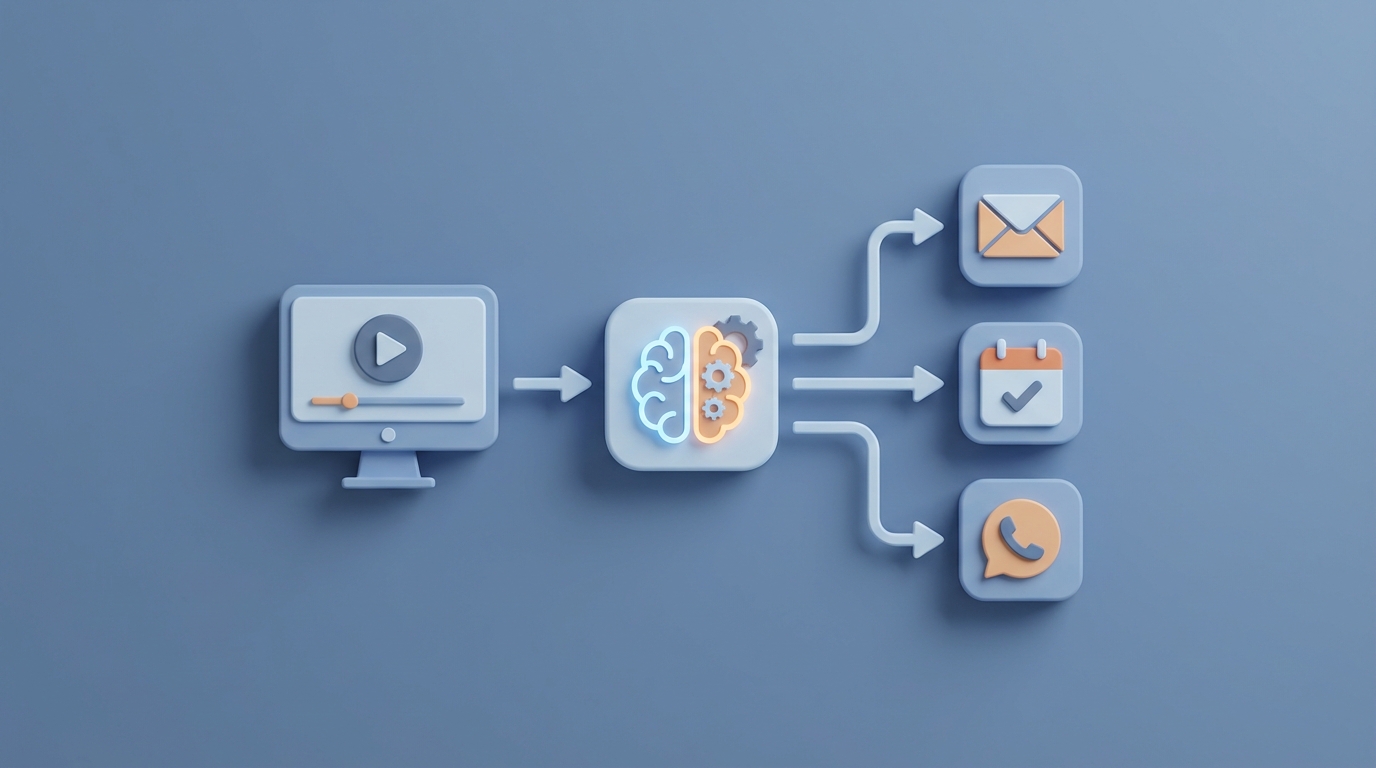
Here's the thing: most of this work is now automatable. Not with another Zapier chain held together with duct tape, but with an actual AI agent that understands context from the demo, drafts personalized follow-ups, updates your pipeline, and queues the right content — all before the prospect has finished their post-demo coffee.
This guide walks through exactly how to build that agent using OpenClaw, what it should handle, what it shouldn't, and what kind of time and money you get back.
The Manual Workflow Today (And Why It's Bleeding You Dry)
Let's map out what actually happens after a sales demo in most organizations. Not the idealized version from your sales playbook — the real one.
Step 1: Note-Taking and Debrief (5–10 minutes) The rep scrambles to jot down key points while they're still fresh. Stakeholder names, pain points mentioned, objections raised, competitor name-drops, budget signals, timeline hints. This usually lands in a Google Doc, a Notion page, or — let's be honest — a sticky note that gets lost.
Step 2: CRM Logging (5–10 minutes) Now the rep opens Salesforce or HubSpot and updates the opportunity. Stage change, products discussed, deal value estimate, next steps field, maybe attaching the recording link. This is pure data entry, and reps despise it.
Step 3: Crafting the Follow-Up Email (10–15 minutes) This is the critical one. A good follow-up email references specific moments from the demo, acknowledges the prospect's pain points by name, proposes clear next steps, and includes relevant resources. Most reps either spend too long making it perfect or give up and send a generic template. Neither outcome is great.
Step 4: Assembling Resources (5–10 minutes) Hunting through Google Drive, the marketing portal, or Slack messages to find the right case study, the ROI calculator that matches this prospect's industry, or the technical architecture doc that the CTO asked about. Every. Single. Time.
Step 5: Scheduling the Next Meeting (5–10 minutes) Back-and-forth emails or messages to get the follow-up call on the calendar. Sometimes this takes days and multiple nudges.
Step 6: Building a Nurture Sequence (5–10 minutes) If the deal doesn't move immediately, the rep sets up a multi-touch sequence — a series of emails, maybe a LinkedIn message, possibly a phone call — spread over the next few weeks. This requires thinking through timing, messaging variations, and escalation logic.
Step 7: Pipeline Hygiene (5 minutes) Updating forecast probability, creating tasks for future follow-ups, flagging the deal for sales engineering review, or setting a reminder to loop in an executive sponsor.
Total time per demo: 25–45 minutes of pure administrative work.
Multiply that by 8–12 demos per week, and each rep is burning 4–9 hours weekly on tasks that don't involve talking to a prospect. Salesforce's own State of Sales report from 2026 found that reps spend only 28–36% of their time actually selling. The rest is this.
And here's the real cost nobody talks about: speed. The Harvard Business Review found that responding within five minutes of a prospect interaction makes you 9x more likely to convert. But the average post-demo follow-up takes 24–48 hours. By the time your carefully crafted email lands, the prospect has already had three other vendor demos and forgotten half of what you showed them.
What Makes This Painful (Beyond Just Time)
Time waste is the obvious problem. The less obvious ones are worse.
Inconsistency kills your pipeline. When you have a team of ten reps, you get ten different follow-up qualities. Your top performer sends a masterfully personalized recap within an hour. Your newest hire sends a template with the wrong company name two days later. The prospect experience is random, and your conversion data is meaningless because you can't tell if the process works or if individual reps work.
Context evaporates. Gong's analysis of over two million sales calls found that deals where the follow-up email referenced specific demo moments had 23% higher close rates. But capturing those moments accurately, in real time, while also presenting and reading the room? That's asking a lot. Most reps remember the big stuff and forget the details that actually matter — the offhand comment about a competitor's pricing, the question about a specific integration, the moment the CFO leaned in.
Follow-up sequences die early. HubSpot's State of Sales data shows that 80% of sales require five or more follow-up attempts, but 48% of salespeople never follow up more than once. It's not laziness. It's that manually managing multi-touch sequences across dozens of active deals is genuinely hard. Things slip through the cracks because there are too many cracks.
The financial impact is real. InsideSales research estimates that sales teams lose 27% of deals due to inadequate follow-up. For a team closing $5M annually, that's $1.35M left on the table — not because the product wasn't right, but because the email was late, generic, or never sent at all.
What AI Can Handle Right Now
Let's be specific about what's realistic today, not in some theoretical future. Using OpenClaw, you can build an AI agent that handles the following without human intervention:
Demo Transcription and Structured Summarization The agent ingests the demo recording (via integration with your video conferencing tool) and produces a structured summary: key pain points discussed, stakeholders present and their roles, objections raised, features that generated interest, competitive mentions, stated timeline, and budget signals. This isn't a raw transcript dump — it's organized, tagged, and actionable.
CRM Auto-Update Based on the structured summary, the agent updates your CRM automatically. Opportunity stage, products of interest, deal value estimate, key contacts, and a formatted notes field. No rep data entry required.
Personalized Follow-Up Email Draft This is where it gets powerful. The agent drafts a follow-up email that references specific moments from the demo — actual quotes and pain points — proposes concrete next steps based on where the conversation ended, and matches the rep's writing style. It's not a template with merge fields. It's a contextually aware email that reads like the rep spent twenty minutes crafting it.
Intelligent Resource Matching Based on the prospect's industry, company size, use case, and specific questions asked during the demo, the agent pulls relevant resources from your content library. The right case study. The right technical doc. The right ROI calculator. Attached and ready.
Multi-Touch Sequence Generation The agent builds a complete nurture sequence — not just the first email, but emails two through five, with appropriate spacing, escalation in urgency, varied angles (social proof, technical depth, executive summary), and suggested LinkedIn touchpoints. Each message in the sequence references context from the original demo so it doesn't feel like a generic drip campaign.
Meeting Scheduling Automation The agent includes scheduling links with appropriate meeting types (technical deep-dive, executive alignment, procurement review) based on where the deal stands and what was discussed.
Step-by-Step: Building the Post-Demo Follow-Up Agent on OpenClaw
Here's how to actually build this. No hand-waving.
Step 1: Define Your Data Inputs
Your agent needs access to three categories of data:
- Demo recordings/transcripts — from Zoom, Google Meet, Teams, or whatever you use. Most platforms offer API access to recordings, or you can use a conversation intelligence tool like Fireflies or tl;dv as an intermediary that feeds transcripts into OpenClaw.
- CRM data — the existing opportunity record, contact information, account history, and any prior interactions. OpenClaw connects to Salesforce, HubSpot, and Pipedrive via API.
- Content library — your case studies, technical docs, ROI calculators, and proposal templates. This can live in Google Drive, Notion, or a dedicated CMS. The agent needs to be able to search and retrieve from it.
Step 2: Build the Transcript Analysis Module
In OpenClaw, create an agent that takes the raw transcript as input and outputs structured JSON. Here's the schema you want:
{
  "prospect_company": "string",
  "attendees": [
    {
      "name": "string",
      "role": "string",
      "engagement_level": "high | medium | low",
      "key_questions": ["string"]
    }
  ],
  "pain_points": ["string"],
  "features_of_interest": ["string"],
  "objections": [
    {
      "objection": "string",
      "resolution_status": "resolved | open | deferred"
    }
  ],
  "competitor_mentions": ["string"],
  "budget_signals": "string",
  "timeline": "string",
  "buying_stage": "early | mid | late",
  "sentiment": "positive | neutral | cautious | negative",
  "recommended_next_step": "string",
  "key_quotes": ["string"]
}
Prompt your OpenClaw agent with clear instructions: extract structured data from the transcript, identify who said what, flag moments of strong engagement or concern, and surface direct quotes that reveal buying intent or hesitation. The key here is specificity in your prompt engineering. Tell the agent exactly what constitutes a "pain point" versus a "feature request" versus an "objection." Give it examples from your actual sales conversations.
Step 3: Build the CRM Update Module
This module takes the structured JSON from Step 2 and maps it to your CRM fields. In OpenClaw, set up the API connection to your CRM and define the field mappings:
buying_stage→ Opportunity Stagefeatures_of_interest→ Products/Services fieldbudget_signals+ deal context → Deal Valuerecommended_next_step→ Next Steps fieldpain_points+objections+key_quotes→ Notes field (formatted)attendees→ Contact Roles on the opportunity
Configure the agent to check for existing data before overwriting. You don't want it replacing a carefully built contact list — you want it appending new information.
Step 4: Build the Email Drafting Module
This is the module that saves the most time and has the highest impact. Your OpenClaw agent should take the structured demo summary, the prospect's company information (pulled from CRM or enrichment data), and a rep-specific style guide as inputs.
The prompt structure should follow this logic:
You are drafting a post-demo follow-up email on behalf of [Rep Name].

Context:
- Demo summary: [structured JSON from Step 2]
- Rep's writing style: [examples of past emails or style notes]
- Company context: [firmographic data, recent news, industry]

Requirements:
- Open with a specific reference to something discussed in the demo
- Acknowledge 1-2 key pain points by name
- Briefly recap how the product addresses those pain points
- Include 1-2 relevant resources (matched from content library)
- Propose a specific next step with a scheduling link
- Keep it under 200 words
- Tone: professional but human, not salesy
- Do NOT use phrases like "I hope this email finds you well" or "Just circling back"
The output goes into a draft state — the rep reviews and sends. More on why in the "what still needs a human" section.
Step 5: Build the Resource Matching Module
Connect your content library to OpenClaw and index it with metadata: industry, company size, use case, product area, content type (case study, technical doc, ROI calculator, etc.).
The agent matches based on the demo summary. If the prospect is a mid-market fintech company concerned about compliance, and they asked about your API documentation, the agent pulls the fintech case study, the compliance whitepaper, and the API docs. Not everything in the library — just what's relevant.
Step 6: Build the Sequence Generator
For deals that need nurturing, the agent generates a full multi-touch sequence. Each email in the sequence should:
- Reference original demo context (not just the first email — all of them)
- Vary the angle: email 2 might focus on social proof, email 3 on technical depth, email 4 on ROI, email 5 on executive summary
- Escalate appropriately: later emails can reference the lack of response without being pushy
- Include suggested timing (e.g., Day 1, Day 3, Day 7, Day 14, Day 21)
Load this sequence into your sales engagement platform (Outreach, Salesloft, HubSpot sequences) via OpenClaw's integrations.
Step 7: Orchestrate the Workflow
In OpenClaw, chain these modules into a single workflow triggered by "demo completed." The flow:
- Demo recording lands → transcript generated
- Transcript → structured summary (Step 2)
- Summary → CRM update (Step 3)
- Summary + CRM data + content library → follow-up email draft (Step 4 + 5)
- Summary → nurture sequence (Step 6)
- Email draft + sequence → delivered to rep for review and approval
The entire chain should execute within minutes of the demo ending. By the time the rep finishes their bathroom break, everything is ready.
What Still Needs a Human
Building this agent doesn't mean removing humans from the process. It means removing them from the wrong parts of the process. Here's what a human still needs to do:
Review and approve the follow-up email. The agent drafts it; the rep reads it, tweaks the tone if needed, and hits send. This takes 2–3 minutes instead of 15. The rep's job shifts from creating the email to quality-checking it, which is a much better use of their judgment.
Strategic deal decisions. Should we bring in an executive sponsor? Is this deal worth discounting? Are we competing against an incumbent with deep relationships? The agent surfaces information to support these decisions, but the decisions themselves require human judgment, political awareness, and relationship context that AI can't replicate.
Complex objection handling. If the demo surfaced a nuanced objection — say, concerns about data sovereignty in a specific jurisdiction, or anxiety about organizational change management — the rep needs to address this with care, not a generated paragraph.
Pricing and negotiation. The agent can surface what was discussed and recommend next steps, but final commercial terms need human oversight. Always.
Relationship calibration. Knowing when to push and when to back off, reading between the lines of a prospect's hesitation, understanding internal politics at the target company — this is human territory.
The 70/30 rule applies cleanly here: the agent handles 70% of the work (the repetitive, time-consuming, context-capture stuff), and the rep handles the 30% that actually requires a brain and a relationship.
Expected Time and Cost Savings
Let's do the math with conservative numbers.
Time savings per rep:
- Current post-demo admin: ~35 minutes per demo (midpoint estimate)
- With OpenClaw agent: ~5 minutes per demo (review and approve)
- Savings: 30 minutes per demo
- At 10 demos per week: 5 hours saved per rep per week
- For a team of 10 reps: 50 hours per week returned to actual selling
Revenue impact:
- Faster follow-up (minutes instead of hours/days) → better conversion per the 5-minute response data
- More personalized follow-up → 23% higher close rates per Gong's research
- More consistent sequences (5+ touches actually happening) → fewer deals lost to neglect
- Conservative estimate: 15–25% improvement in demo-to-close conversion rate
Direct cost savings:
- 50 hours per week at a blended rep cost of $75/hour (salary + benefits + tools) = $3,750/week or roughly $195,000/year in recaptured productivity for a 10-person team
- That's not even counting the revenue upside from better conversion
The ROI on building this agent is hard to argue with, even if you discount these numbers by half.
The Bigger Picture
The post-demo follow-up is one of the highest-leverage workflows in sales to automate because it sits at the intersection of high volume, high repetition, and high impact. Every demo is an opportunity, and the follow-up is what converts that opportunity into pipeline movement.
Companies that have implemented AI-augmented follow-up workflows — even partial ones — are seeing 15–30% improvements in conversion from demo to closed-won. The teams that build this well don't just save time; they create a structural advantage. Their follow-ups are faster, more personalized, more consistent, and more persistent than their competitors'. And their reps are spending those reclaimed hours on the activities that actually require human intelligence: building relationships, navigating complex deals, and closing.
The technology to do this properly exists today. OpenClaw gives you the platform to build, chain, and deploy these agents without stitching together fifteen different tools with brittle integrations. The question isn't whether to automate post-demo follow-up — it's how fast you can get it running.
Want to skip the build and get a post-demo follow-up agent deployed for your team? Browse pre-built sales automation agents on Claw Mart, or submit a Clawsourcing request and let our community of OpenClaw builders design one tailored to your exact sales workflow, CRM, and follow-up process. Describe what you need, set your budget, and let the builders compete to deliver it.
Recommended for this post
Your orchestrator that coordinates agent swarms with task decomposition and consensus protocols -- agents working together.
 SpookyJuice.ai
Your agent builder that designs self-healing autonomous systems with perception-action loops -- agents that run themselves.
SpookyJuice.ai
Your memory engineer that builds persistent context, tiered storage, and retrieval systems -- agents that remember.
SpookyJuice.ai