How to Automate Podcast Episode Production with AI
How to Automate Podcast Episode Production with AI
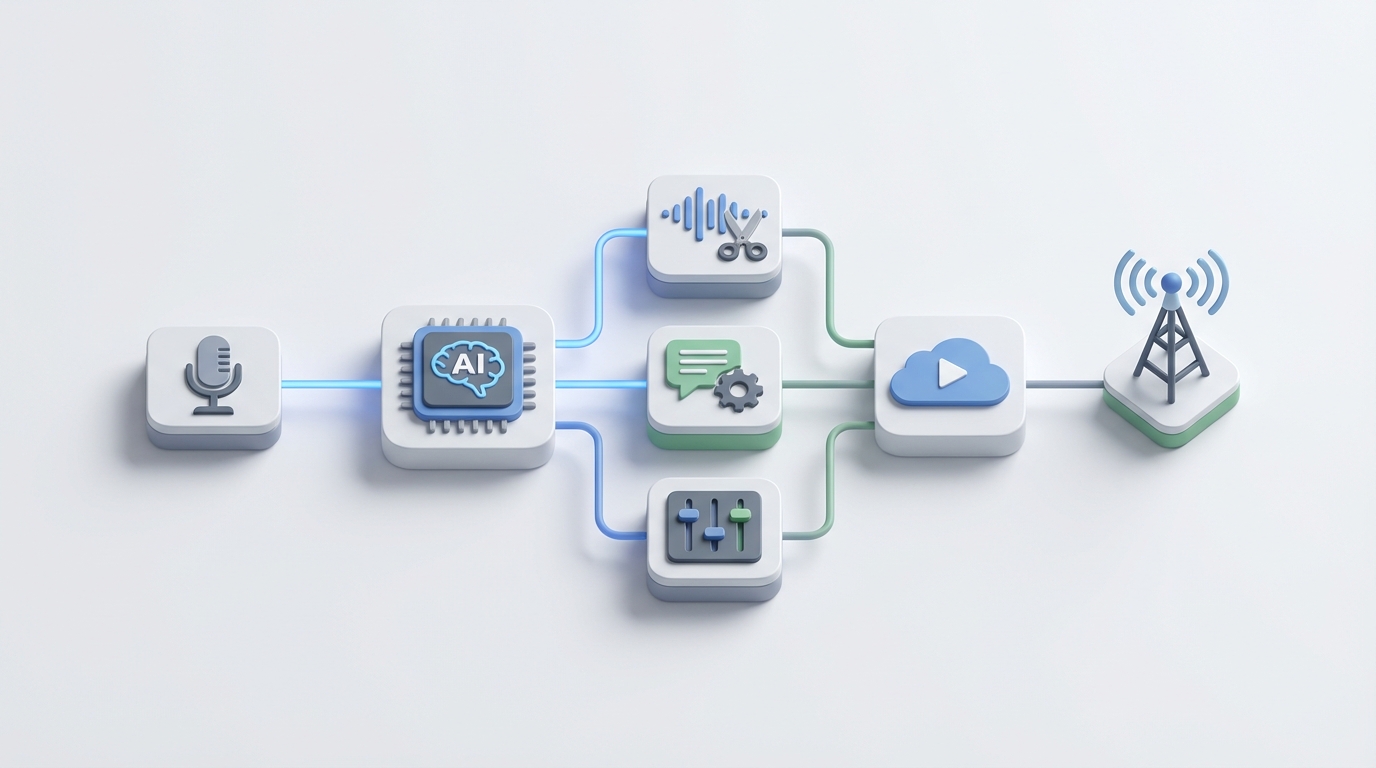
Every podcaster I've talked to says some version of the same thing: "I love recording. I hate everything that comes after."
And they're right to hate it. The recording is the fun part — the conversation, the ideas, the energy. Everything after that is a slow grind of removing filler words, leveling audio, writing show notes, cutting clips, uploading files, and formatting descriptions. It's the kind of work that makes you question why you started a podcast in the first place.
Here's what's wild: the average podcaster spends about 10 hours per episode. If you're doing weekly episodes and including clip creation for social, that number climbs to 15–20 hours. The recording itself? Maybe an hour. So you're spending 90% of your time on stuff that isn't the actual creative work.
That ratio is broken. And it's exactly the kind of broken that AI agents are good at fixing.
This post walks through how to automate the bulk of podcast production using an AI agent built on OpenClaw — what you can realistically automate today, what still needs a human, and how to set the whole thing up step by step.
The Manual Workflow (And Why It's Killing Your Team)
Let's be honest about what producing a single podcast episode actually looks like for most business teams:
Pre-production: 2–6 hours
- Research the guest or topic
- Write an outline or script
- Handle scheduling, pre-interview calls, briefing docs
- Prepare recording environment
Recording: 1–2 hours
- Technical setup (mics, remote recording software, lighting if video)
- The actual conversation
- Troubleshooting the inevitable tech issues
Post-production: 4–20+ hours
This is the monster. Here's the breakdown:
- Raw audio cleanup — noise reduction, removing background hum, leveling volumes between speakers
- Content editing — cutting "ums," "uhs," "you knows," awkward pauses, tangents that went nowhere, false starts
- Assembly — adding intro/outro, music beds, transitions, sponsor reads
- Mixing and mastering — EQ, compression, limiting, making it sound professional
- Transcription — generating and then editing the transcript (auto-transcripts are close but never perfect)
- Show notes and metadata — writing episode descriptions, chapter markers, SEO titles, keywords
- Social clips — identifying the best 15–60 second moments, cutting them, adding captions, formatting for vertical video
- Distribution — uploading to your hosting platform, pushing to directories, posting to social channels
- Promotion — writing social copy, scheduling posts, sending the newsletter
For a solo creator or small marketing team, that's 8–25 hours per episode. Even with a professional editor, you're looking at 4–8 hours plus $150–$400 per episode in editing costs alone.
If you're running a weekly show, that's a part-time job just for production. Two shows? You need a full-time producer ($70k–$110k salary) or an agency ($1,500–$4,000 per episode).
This is not sustainable for most businesses.
What Makes This Painful
The time cost is obvious. But there are less visible problems:
Editor dependency. Good podcast editors are expensive and hard to find. When your editor leaves or gets busy, your show grinds to a halt. The knowledge of "how this show should sound" walks out the door with them.
The clip creation bottleneck. A one-hour episode might contain 15–30 potential social clips. Manually scrubbing through the full recording to find and cut them is brutal. Most teams either skip it entirely (leaving massive distribution value on the table) or do a half-hearted job (posting 2–3 mediocre clips instead of the 8–10 great ones).
Inconsistent quality. When you're recording remote guests, audio quality varies wildly. One guest has a studio mic, the next is on their laptop in a coffee shop. Normalizing this manually is tedious.
Creative fatigue. Your creative team didn't sign up to spend six hours removing filler words. The repetitive technical work kills enthusiasm for the show itself. I've seen multiple business podcasts die not because the conversations were bad, but because the production burden burned the team out.
Compounding delays. When every episode takes 15+ hours of production work, you're always behind. Episodes go up late, social clips trail by days, and the whole content engine loses momentum.
What AI Can Actually Handle Right Now
I want to be clear: I'm not going to tell you AI can do everything. It can't. But it can reliably handle the boring 70% — which is exactly the part that's killing you.
Here's what works well with current technology, and how each piece maps to an OpenClaw agent:
Audio cleanup and enhancement — Noise reduction, echo removal, and audio leveling are essentially solved problems. AI tools handle this as well or better than most human editors. Your OpenClaw agent can trigger these processes automatically when a new recording file lands in your storage.
Filler word removal — Detecting and removing "um," "uh," "like," "you know," and similar verbal tics is highly accurate now. This alone can save 1–3 hours per episode.
Transcription and speaker identification — Near-perfect in decent audio quality. The agent generates the transcript, identifies speakers, and formats it — no manual pass needed in most cases.
Leveling, compression, and basic mastering — Standardizing volume levels, applying compression, and doing basic mastering to make the episode sound polished. This is rule-based enough that AI handles it cleanly.
Show notes, chapters, and metadata — Given a transcript, an AI agent can generate first-draft show notes, chapter markers with timestamps, episode titles, SEO-optimized descriptions, and keyword tags. These drafts are typically 80–90% there — a quick human review is all they need.
Social clip identification and creation — This is where the leverage is enormous. An OpenClaw agent can analyze the full transcript, identify the highest-engagement moments (based on patterns like strong opinions, surprising statements, emotional peaks, quotable lines), and cut them into clips with captions. Instead of manually scrubbing an hour of audio, you get 10–15 candidate clips delivered to a review queue.
Distribution and uploading — Formatting files, writing platform-specific metadata, uploading to your hosting platform, and triggering distribution. Pure automation territory.
Step by Step: Building the Podcast Production Agent on OpenClaw
Here's how to actually set this up. The goal is an agent that takes a raw recording file as input and outputs a near-finished episode with clips, show notes, and distribution-ready assets — with human checkpoints where they matter.
Step 1: Define the Trigger
Your agent needs a starting point. The simplest trigger: a new audio (or video) file dropped into a designated folder — Google Drive, Dropbox, S3, wherever your team saves raw recordings.
In OpenClaw, you configure this as an event trigger:
trigger:
  type: file_upload
  source: google_drive
  folder: /podcast/raw-recordings
  file_types: [.wav, .mp3, .mp4]
When the file appears, the pipeline kicks off.
Step 2: Audio Processing Pipeline
The first task in the agent handles all the technical audio work:
tasks:
  - name: audio_enhancement
    steps:
      - noise_reduction:
          sensitivity: medium
          preserve_voice: true
      - filler_word_removal:
          words: ["um", "uh", "like", "you know", "sort of", "kind of"]
          min_confidence: 0.85
      - silence_trimming:
          max_silence_ms: 1500
          fade: true
      - level_normalization:
          target_lufs: -16
          true_peak: -1.5
      - compression:
          ratio: 3:1
          threshold: -18db
The min_confidence: 0.85 on filler word removal is important. You don't want the agent cutting words that sound like filler but are actually part of a sentence. Setting the confidence threshold slightly conservative means it catches the obvious ones and leaves edge cases for a human.
Target LUFS of -16 is the standard for most podcast platforms. The agent handles this automatically so you don't have to think about it.
Step 3: Transcription and Speaker Labeling
  - name: transcription
    steps:
      - transcribe:
          model: whisper_large_v3
          language: en
          speaker_diarization: true
          speaker_labels:
            speaker_1: "Host Name"
            speaker_2: "auto_detect"
      - format_transcript:
          style: timestamped
          paragraph_breaks: true
          output: [.txt, .srt, .vtt]
The agent generates the transcript with speaker labels and timestamps, outputting in multiple formats — plain text for show notes, SRT/VTT for captions.
Step 4: Content Generation
This is where the AI agent earns its keep on the content side:
  - name: content_generation
    steps:
      - generate_show_notes:
          source: transcript
          format: markdown
          include: [summary, key_topics, guest_bio, links_mentioned]
          tone: "conversational, direct"
          max_length: 500_words
      - generate_chapters:
          source: transcript
          min_chapter_length: 3_minutes
          format: podcast_chapters_standard
      - generate_titles:
          source: transcript
          count: 5
          style: "specific, not clickbait"
          max_length: 80_chars
      - generate_seo_description:
          source: transcript
          max_length: 160_chars
          include_keywords: true
You get five title options (because the first AI-generated title is rarely the best one), formatted show notes, chapter markers, and an SEO description. All from the transcript, all in seconds.
Step 5: Social Clip Generation
  - name: clip_generation
    steps:
      - identify_highlights:
          source: transcript
          criteria:
            - strong_opinions
            - surprising_statements
            - actionable_advice
            - emotional_peaks
            - quotable_lines
          max_clips: 15
          clip_length: [15s, 30s, 60s]
      - cut_clips:
          source: enhanced_audio
          add_captions: true
          caption_style: "bold_word_highlight"
          format: [vertical_9x16, square_1x1, horizontal_16x9]
      - rank_clips:
          criteria: engagement_potential
          output: ranked_list_with_previews
The agent identifies up to 15 highlight moments, cuts them from the enhanced audio, adds captions, and formats them for different platforms (vertical for TikTok/Reels/Shorts, square for LinkedIn, horizontal for YouTube). Then it ranks them by predicted engagement potential.
Your human reviewer picks the best 5–8 from a ranked list of 15 instead of scrubbing through an hour of raw audio. That's a fundamentally different task — curation vs. creation.
Step 6: Assembly
  - name: episode_assembly
    steps:
      - add_intro:
          file: /podcast/assets/intro_v3.wav
          crossfade_ms: 500
      - add_outro:
          file: /podcast/assets/outro_v2.wav
          crossfade_ms: 500
      - insert_sponsor_reads:
          positions: [pre_roll, mid_roll_25pct, mid_roll_75pct]
          files: /podcast/assets/sponsors/current/
      - add_music_bed:
          file: /podcast/assets/music_bed.wav
          sections: [intro, outro]
          volume: -18db
      - export:
          format: [.mp3, .wav]
          mp3_bitrate: 192kbps
          metadata:
            title: "{{generated_title_1}}"
            description: "{{generated_seo_description}}"
            chapters: "{{generated_chapters}}"
The agent stitches together the intro, enhanced episode audio, sponsor reads, outro, and music bed. It exports in the right formats with all metadata embedded.
Step 7: Human Review Checkpoint
This is critical. Don't skip this.
  - name: human_review
    type: approval_gate
    notify: [slack_channel, email]
    review_items:
      - enhanced_audio_preview
      - transcript_accuracy_spot_check
      - show_notes_draft
      - title_options
      - ranked_clips_with_previews
    actions:
      - approve_all
      - approve_with_edits
      - reject_and_reprocess
The agent sends everything to a Slack channel (or email, or whatever your team uses) for review. Your producer listens to a few minutes of the enhanced audio, scans the show notes, picks the best title, and selects which clips to publish. This should take 20–45 minutes instead of 6+ hours.
Step 8: Distribution
Once approved:
  - name: distribution
    steps:
      - upload_episode:
          platform: buzzsprout
          schedule: "{{approved_publish_date}}"
      - publish_clips:
          platforms: [youtube_shorts, tiktok, instagram_reels, linkedin]
          schedule: staggered_over_5_days
      - update_website:
          page: /podcast/episodes/
          content: [show_notes, transcript, embedded_player]
      - send_newsletter:
          template: new_episode
          content: [title, summary, listen_links]
The agent uploads the episode to your hosting platform, schedules social clips across platforms (staggered so you're not dumping everything at once), updates your website with show notes and the embedded player, and triggers your newsletter.
What Still Needs a Human
I said I wouldn't hype this, so here's the honest list of things you should not fully automate:
Content editing decisions. AI is bad at knowing which tangents are charming and which are boring. It might cut a story that seems off-topic but is actually the most memorable part of the episode. Or it might leave in a five-minute ramble that should have been trimmed to two. A human who understands your audience needs to make these calls.
Tone and pacing. The "feel" of your show — how fast it moves, where the breathing room is, what energy the intro sets — this is editorial judgment. AI can follow rules, but it can't feel the rhythm of a good conversation.
Brand voice review. AI-generated show notes and descriptions will be competent but generic unless you train them carefully. Your human reviewer should always check that the written content sounds like your show, not a template.
Clip selection (final call). The agent ranks clips, but the final selection — which 5 clips best represent this episode and will resonate with your specific audience — needs a human with context about your brand, your audience, and what's been working lately.
Legal and compliance review. If you're in a regulated industry (finance, healthcare, legal), someone needs to check that nothing in the episode creates liability issues. Don't automate this.
Guest relationship management. Sending a "thanks for coming on" note, sharing the episode link personally, coordinating on social promotion — these human touches matter and shouldn't be templated into oblivion.
Expected Time and Cost Savings
Let's do the math on a typical weekly business podcast:
| Task | Manual Time | With OpenClaw Agent | Savings |
|---|---|---|---|
| Audio cleanup & enhancement | 1–3 hours | Automated | 1–3 hours |
| Filler word removal | 1–2 hours | Automated | 1–2 hours |
| Content editing review | 2–4 hours | 30–45 min (reviewing AI output) | 1.5–3 hours |
| Transcription + editing | 1–2 hours | Automated + 10 min spot check | 50–110 min |
| Show notes & metadata | 1–2 hours | 10–15 min review | 45–105 min |
| Social clips | 3–5 hours | 20–30 min (selecting from ranked list) | 2.5–4.5 hours |
| Assembly (intro/outro/music) | 30–60 min | Automated | 30–60 min |
| Distribution | 30–60 min | Automated | 30–60 min |
| Total | 10–20 hours | 1.5–2.5 hours | 8–17.5 hours per episode |
That's roughly an 80–85% reduction in production time. For a weekly show, you're getting back 35–70 hours per month.
In dollar terms:
- If you're paying a freelance editor $200–$400 per episode, you can likely reduce that to $50–$100 for the human review portion
- If you have a full-time producer spending 60% of their time on production grunt work, they can now spend that time on creative strategy, guest booking, and audience growth — the stuff that actually moves the needle
- If you're paying an agency $2,000–$4,000 per episode for full production, you can likely bring it in-house with an OpenClaw agent and a part-time reviewer for a fraction of the cost
The most sophisticated businesses I've seen aren't using AI to cut costs — they're using it to do more with the same team. Instead of one show, they're running three. Instead of posting two clips per episode, they're posting eight. The output multiplies while the human effort stays flat.
Getting Started
If you're running a podcast for your business and production is the bottleneck (it almost always is), here's what I'd do:
-
Audit your current workflow. Actually track how many hours each episode takes, broken down by task. You need a baseline.
-
Start with the highest-leverage automation. For most teams, that's clip creation and audio cleanup. These are the biggest time sinks with the most reliable AI solutions.
-
Build your agent on OpenClaw. Use the pipeline structure above as a starting template, then customize it to your show's specific needs — your intro/outro files, your brand voice guidelines, your preferred clip formats.
-
Keep humans in the loop. Set up the approval gate. Don't publish anything without a human review until you've built confidence in the output quality. Over time, you'll learn where you can trust the agent fully and where you need to stay hands-on.
-
Iterate. Your first automated episode won't be perfect. The filler word removal might be too aggressive. The show notes might not match your tone. Tune the parameters, add brand voice examples to the content generation prompts, and refine.
You can find pre-built podcast production agents and workflow templates on Claw Mart — including configurations optimized for interview shows, solo episodes, and panel discussions. If you've already built a production workflow that works well, consider listing it on Claw Mart through the Clawsourcing program. Other podcast teams are looking for exactly what you've already figured out, and you can earn from sharing it.
The technology to automate 80% of podcast production exists right now. The teams that adopt it aren't cutting corners — they're freeing up their creative people to do creative work. That's the whole point.
Recommended for this post

YouTube content production specialist: script writing, SEO optimization, thumbnail concepts, publishing calendar, analytics review, and content repurposing (video → shorts/tweets/blogs).
 Bravo1058AI
One run. Blog post, LinkedIn post, Twitter thread. In your voice. Every time.
 Marco
MarcoTurn your ideas into viral Twitter threads in minutes